Querying the lake, without leaving the warehouse
A warts-included build of Amazon Aurora PostgreSQL's direct query support for Apache Iceberg - real S3 lake, real Serverless v2 cluster, every command and every error message, ending in one query that spans five years of lake history and this morning's live rows.
· #aurora #iceberg #postgres #aws #data-lake
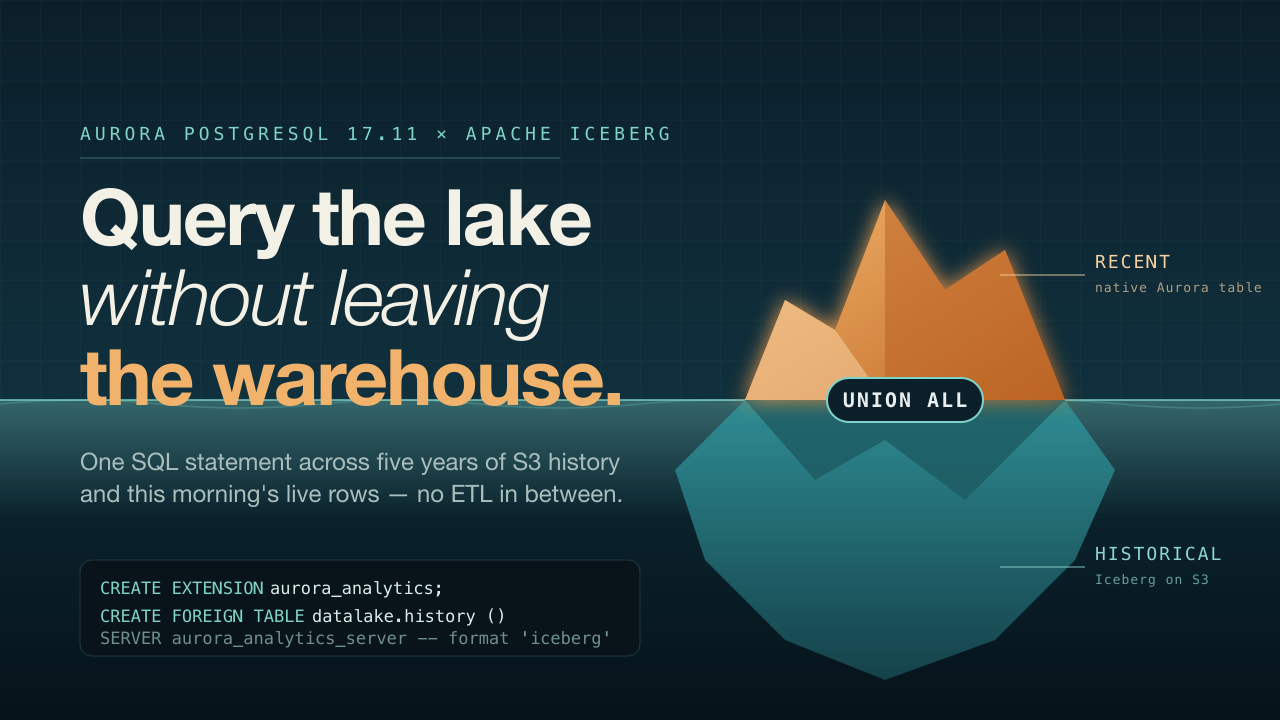
Field notes · Aurora PostgreSQL × Apache Iceberg
A full, warts-included build of Amazon Aurora PostgreSQL's direct query support for Apache Iceberg and Parquet — real S3 lake, real Aurora Serverless v2 cluster, every command and every error message, ending in one query that spans five years of lake history and this morning's live rows.
us-east-1 · account
124355647883· Aurora PostgreSQL 17.11 ·aurora_analyticsextension · Apache Iceberg on S3 + Glue
In this post
- 00 — Why this is worth a build log
- 01 — Lay down the data lake
- 02 — Provision Aurora + the IAM role
- 03 — Turn the extension on, literally
- 04 — The network detour: psql, IPs, and the Data API
- 05 — Point a foreign table at the lake
- 06 — The query that was the point
- 07 — Materializing and monitoring
- 08 — Why bulk
IMPORT FOREIGN SCHEMAdidn't cooperate - 09 — What it costs, and teardown
- 10 — Appendix: every command, in order
Why this is worth a build log
The usual pattern for operational data meets historical data lake is an ETL pipeline: export from Postgres, land it in S3, catalog it in Glue, query it from Athena or Redshift Spectrum, and stitch the two result sets back together in application code. It works, but it's a second system to build, schedule, and keep in sync — and it's stale the moment the export job finishes.
Aurora PostgreSQL's new aurora_analytics extension collapses that into one query. It embeds a DuckDB-based analytical engine directly in the database process, exposes S3-resident Iceberg or Parquet files as foreign tables, and lets a plain SELECT … UNION ALL … read both the live OLTP table and the data lake in a single plan — with predicate pushdown and column pruning so you're not pulling five years of Parquet across the wire to filter one customer.
It ships on Aurora PostgreSQL 17.11+ and 18.6+, across all commercial regions and GovCloud (US). No extra feature fee — it bills as ordinary Aurora compute plus standard S3 request pricing.
I wanted to see it do real work, not a toy example, so I provisioned an actual lake (S3 + Glue + Athena-written Iceberg table) and an actual Aurora Serverless v2 cluster, and pushed data through both paths — including the parts that didn't go the way the docs implied. This is the whole build, in order, errors included.
| Resource | Value |
|---|---|
| Region | us-east-1 |
| Account | 124355647883 |
| Engine | aurora-postgresql 17.11 |
| Instance class | db.serverless (0.5–2 ACU) |
| S3 bucket | iceberg-demo-124355647883-use1 |
| Glue database | iceberg_demo |
| Cluster id | iceberg-demo-cluster |
| IAM role | aurora-analytics-iceberg-demo-role |
01 — Lay down the data lake
An encrypted, access-blocked S3 bucket, a Glue database, a dedicated Athena workgroup, and an Iceberg table created and populated through Athena — the same path most teams already use for lake storage, so the rest of this post isn't testing a hand-rolled table layout.
Bucket, locked down by default
aws s3api create-bucket --bucket iceberg-demo-124355647883-use1 --region us-east-1
aws s3api put-bucket-encryption --bucket iceberg-demo-124355647883-use1 \
  --server-side-encryption-configuration '{"Rules":[{"ApplyServerSideEncryptionByDefault":{"SSEAlgorithm":"AES256"}}]}'
aws s3api put-public-access-block --bucket iceberg-demo-124355647883-use1 \
  --public-access-block-configuration BlockPublicAcls=true,IgnorePublicAcls=true,BlockPublicPolicy=true,RestrictPublicBuckets=true
Catalog and query workgroup
aws glue create-database --database-input '{"Name":"iceberg_demo","Description":"Iceberg demo data lake"}'
aws athena create-work-group --name iceberg-demo-wg \
  --configuration "ResultConfiguration={OutputLocation=s3://iceberg-demo-124355647883-use1/athena-results/},EnforceWorkGroupConfiguration=true"
The Iceberg table itself
CREATE TABLE transaction_history (
  transaction_id   string,
  customer_id      string,
  merchant         string,
  category         string,
  amount           decimal(10,2),
  transaction_date date
)
LOCATION 's3://iceberg-demo-124355647883-use1/iceberg/transaction_history/'
TBLPROPERTIES (
  'table_type'        = 'ICEBERG',
  'format'            = 'parquet',
  'write_compression' = 'snappy'
)
Twenty-five synthetic rows went in across 2021–2025 for two customers (C-1001, C-1002), via a plain INSERT INTO … VALUES through the Athena query engine — no Spark job, no separate writer. Athena handled the Iceberg snapshot, manifest list, and manifest file bookkeeping on its own.
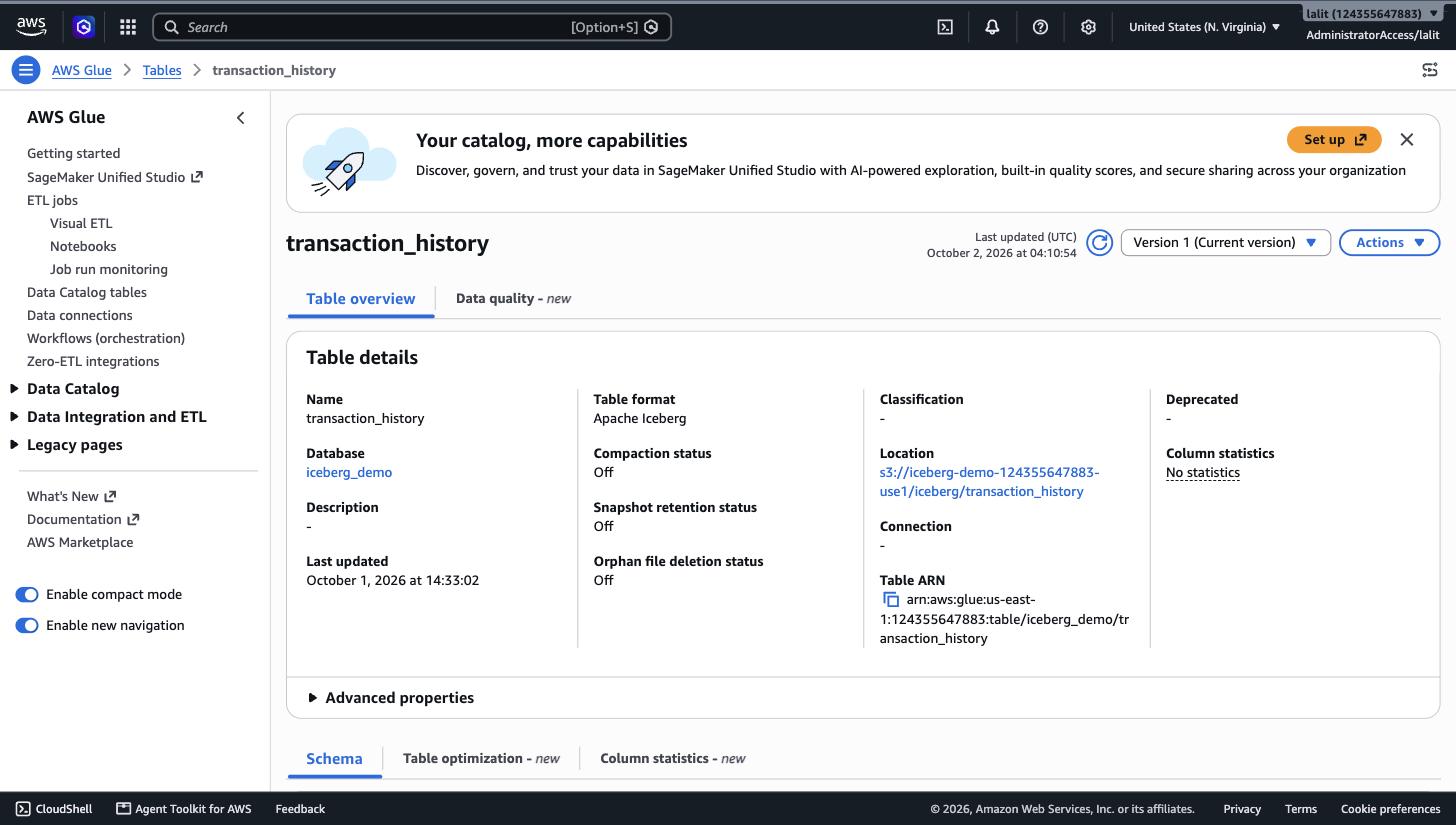
Glue Data Catalog confirms the table format as Apache Iceberg, backed by the S3 location above.
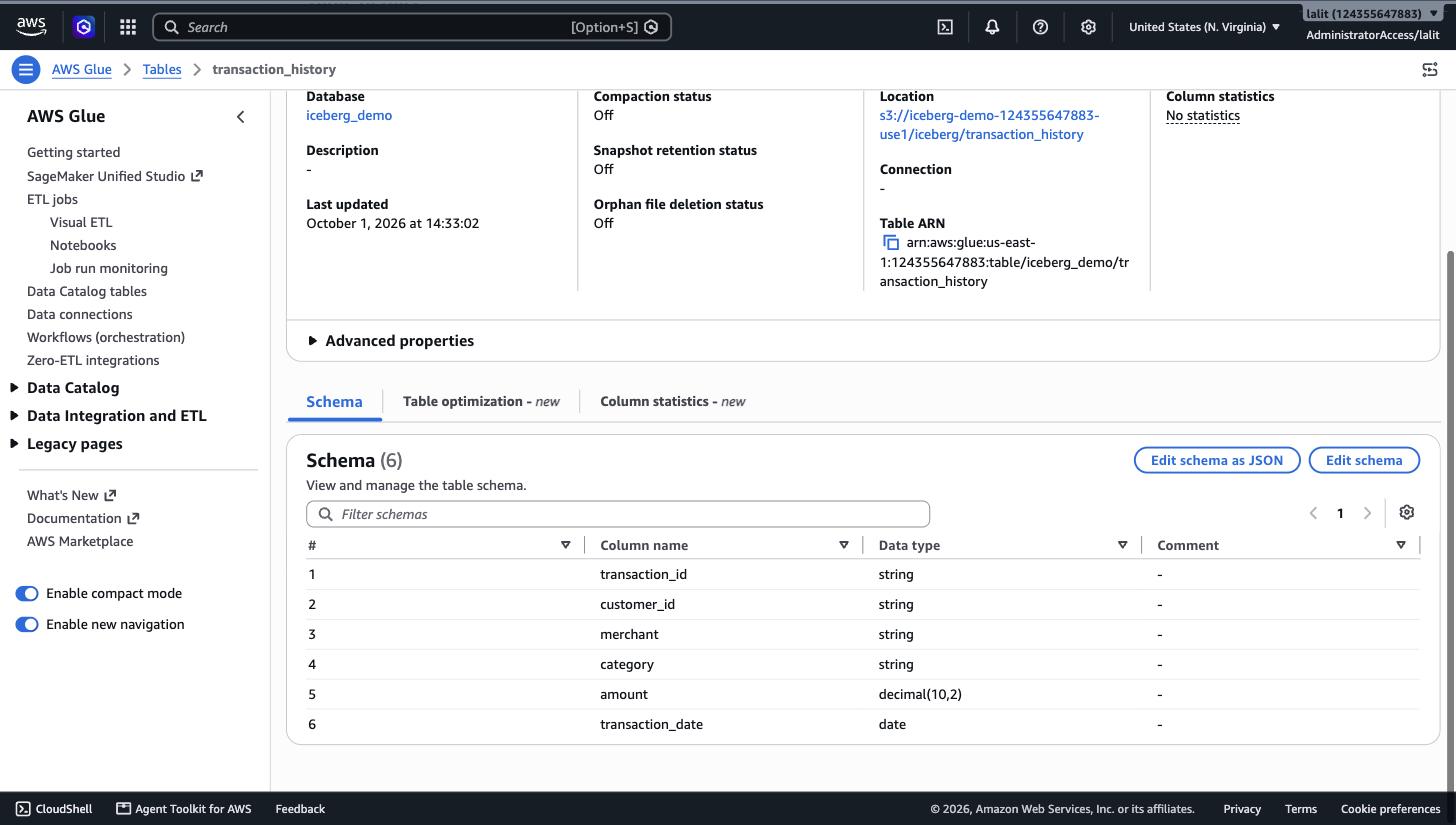
Six-column schema — Glue stores this alongside the current snapshot's metadata pointer.
What Iceberg actually wrote to S3
Worth looking at once, because it's what the extension reads later. One CREATE TABLE and one INSERT produced:
iceberg/transaction_history/data/rLK2Yg/20261001_143300_…-bbc42fae….parquet   1.6 KiB
iceberg/transaction_history/metadata/00000-ca32a237-….metadata.json         1.6 KiB  # table created, no snapshot
iceberg/transaction_history/metadata/00001-3e0c81de-….metadata.json         2.8 KiB  # after INSERT — current snapshot
iceberg/transaction_history/metadata/7346d197-….m0.avro                     6.9 KiB  # manifest file: lists the data file(s)
iceberg/transaction_history/metadata/snap-2553808…-7346d197-….avro          4.2 KiB  # manifest list: lists manifest files
That's the full Iceberg metadata tree: a versioned chain of metadata.json files (one per schema/snapshot change), each pointing at a manifest list, which points at manifest files, which point at the actual Parquet data. Glue's table record stores a pointer to whichever metadata.json is current — that pointer is the detail that matters two sections from now.
02 — Provision Aurora, and attach the right IAM role
The feature needs a specific engine version and a cluster-level IAM role carrying the AuroraAnalytics feature name — a different attachment mechanism from the familiar s3Import/s3Export roles.
Confirming the engine version first
aws rds describe-db-engine-versions --engine aurora-postgresql --region us-east-1 \
  --query "DBEngineVersions[?EngineVersion>='17.11'].EngineVersion" --output text
# 17.4  17.5  17.6  17.7  17.9  17.11  18.3  18.4  18.6

aws rds describe-db-engine-versions --engine aurora-postgresql --engine-version 17.11 --region us-east-1 \
  --query "DBEngineVersions[0].SupportedFeatureNames"
# ["AuroraAnalytics","Bedrock","Comprehend","Lambda","s3Export","s3Import","SageMaker"]
17.11 was there and listed AuroraAnalytics as a supported feature — good to check before committing to a region, since feature rollout isn't simultaneous everywhere.
Networking: default VPC, a scoped security group
aws ec2 describe-vpcs --filters Name=is-default,Values=true \
  --query "Vpcs[0].{VpcId:VpcId,Cidr:CidrBlock}"
# vpc-06c509af1b41ad067, 172.31.0.0/16

aws ec2 create-security-group --group-name iceberg-demo-aurora-sg \
  --description "Aurora PG Iceberg demo SG" --vpc-id vpc-06c509af1b41ad067
aws ec2 authorize-security-group-ingress --group-id sg-03637899b91bbe492 \
  --protocol tcp --port 5432 --cidr "$(curl -s https://checkip.amazonaws.com)/32"

aws rds create-db-subnet-group --db-subnet-group-name iceberg-demo-subnet-group \
  --subnet-ids subnet-03e3101001a5ab93a subnet-026b224af306b66fc subnet-0f4dc0e2700e90d1f
The cluster: Serverless v2, Data API enabled
aws rds create-db-cluster \
  --db-cluster-identifier iceberg-demo-cluster \
  --engine aurora-postgresql --engine-version 17.11 \
  --master-username pgadmin --master-user-password '•••••••••••••••••' \
  --db-subnet-group-name iceberg-demo-subnet-group \
  --vpc-security-group-ids sg-03637899b91bbe492 \
  --serverless-v2-scaling-configuration MinCapacity=0.5,MaxCapacity=2 \
  --enable-http-endpoint \
  --storage-encrypted \
  --database-name icebergdemo

aws rds create-db-instance \
  --db-instance-identifier iceberg-demo-instance-1 \
  --db-cluster-identifier iceberg-demo-cluster \
  --engine aurora-postgresql --db-instance-class db.serverless \
  --publicly-accessible
I enabled --enable-http-endpoint (the RDS Data API) up front without a strong reason to at the time — it turned out to be the thing that rescued step 04. 0.5–2 ACU is intentionally thin; this cluster never needed to scale up for a 25-row demo table.
The IAM role — this is the part that's new
Not the usual rds-s3-export-role pattern. It's a standard role trusting rds.amazonaws.com, but it attaches to the cluster under a named feature, and it needs both S3 and Glue Catalog read access:
// trust-policy.json
{
  "Version": "2012-10-17",
  "Statement": [{
    "Effect": "Allow",
    "Principal": { "Service": "rds.amazonaws.com" },
    "Action": "sts:AssumeRole"
  }]
}
// analytics-policy.json
{
  "Version": "2012-10-17",
  "Statement": [
    {
      "Sid": "S3DataLakeAccess",
      "Effect": "Allow",
      "Action": ["s3:GetObject", "s3:ListBucket"],
      "Resource": [
        "arn:aws:s3:::iceberg-demo-124355647883-use1",
        "arn:aws:s3:::iceberg-demo-124355647883-use1/*"
      ]
    },
    {
      "Sid": "GlueCatalogAccess",
      "Effect": "Allow",
      "Action": [
        "glue:GetDatabase", "glue:GetDatabases",
        "glue:GetTable", "glue:GetTables",
        "glue:GetPartition", "glue:GetPartitions"
      ],
      "Resource": [
        "arn:aws:glue:us-east-1:124355647883:catalog",
        "arn:aws:glue:us-east-1:124355647883:database/iceberg_demo",
        "arn:aws:glue:us-east-1:124355647883:table/iceberg_demo/*"
      ]
    }
  ]
}
aws iam create-role --role-name aurora-analytics-iceberg-demo-role \
  --assume-role-policy-document file://trust-policy.json
aws iam put-role-policy --role-name aurora-analytics-iceberg-demo-role \
  --policy-name AuroraAnalyticsS3GlueAccess --policy-document file://analytics-policy.json

aws rds add-role-to-db-cluster \
  --db-cluster-identifier iceberg-demo-cluster \
  --role-arn arn:aws:iam::124355647883:role/aurora-analytics-iceberg-demo-role \
  --feature-name AuroraAnalytics
Timing detail. The role attachment only succeeds once the cluster status is
available— attempting it duringcreatingthrowsInvalidDBClusterStateFault. After a successful attach,describe-db-clustersshows the role's status asPENDINGfor roughly a minute before flipping toACTIVE; nothing downstream works until it does.
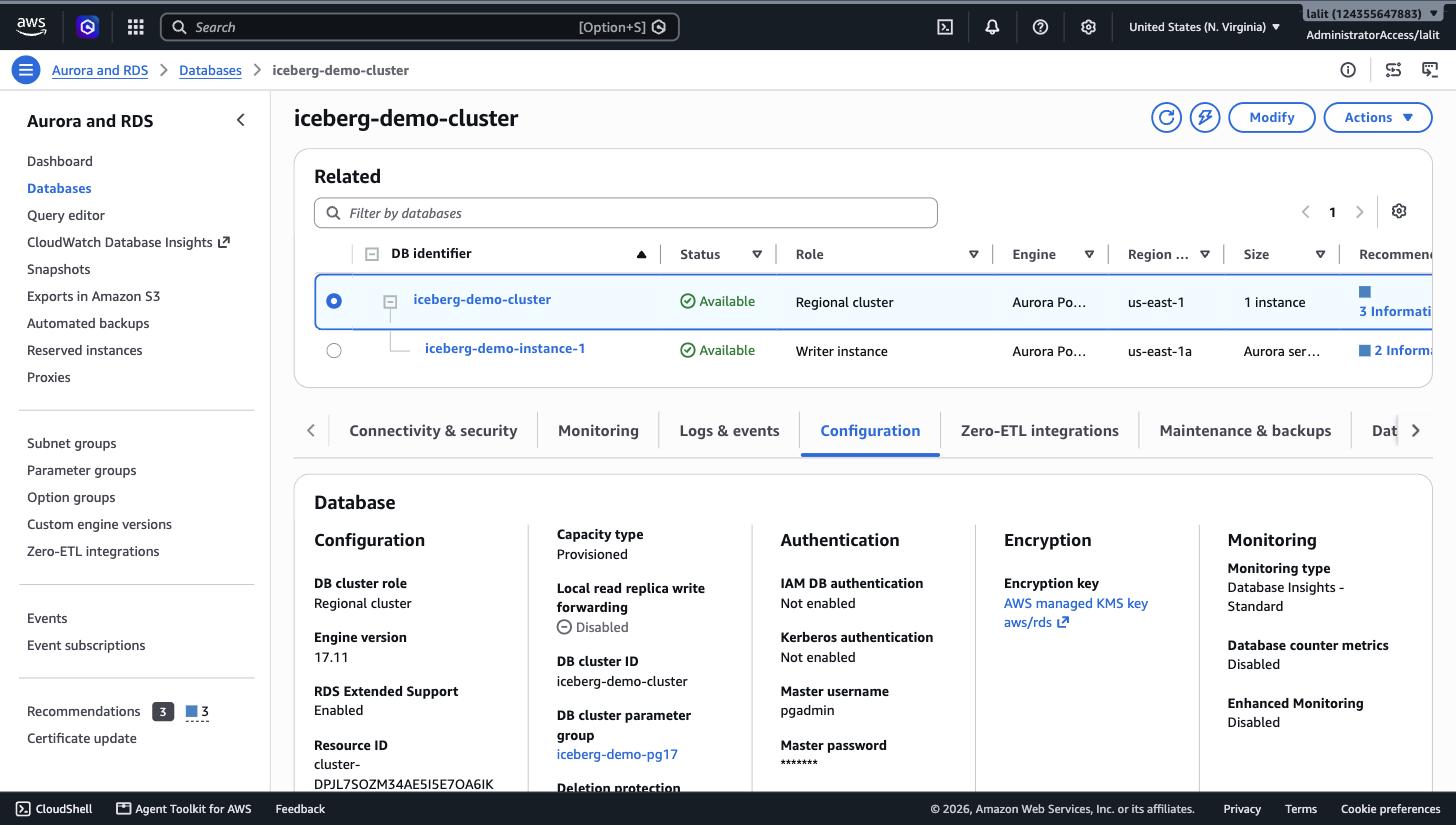
Engine 17.11, custom cluster parameter group visible — the next section is why that parameter group exists.
03 — Turn the extension on, literally
CREATE EXTENSION succeeds immediately and registers the foreign-data wrapper. That is not the same as the engine being willing to use it.
CREATE EXTENSION aurora_analytics;
-- Query OK. SELECT srvname FROM pg_foreign_server;         → aurora_analytics_server
--           SELECT fdwname FROM pg_foreign_data_wrapper;   → aurora_analytics_fdw

CREATE SCHEMA datalake;
IMPORT FOREIGN SCHEMA iceberg_demo FROM SERVER aurora_analytics_server INTO datalake;
-- ERROR: aurora_analytics is not enabled
-- Hint: Set aurora_analytics.enabled to true in the parameter group and retry the query.
-- SQLState: XX000
Snag — easy to miss. The extension object creates cleanly, the server and FDW both register, which reads as "it's on." It isn't.
aurora_analytics.enabledlives in a cluster parameter group, defaults to off, and itsApplyMethodispending-reboot— editing the parameter group doesn't take effect until the instance restarts.
The fix, in full
aws rds create-db-cluster-parameter-group \
  --db-cluster-parameter-group-name iceberg-demo-pg17 \
  --db-parameter-group-family aurora-postgresql17

aws rds modify-db-cluster-parameter-group \
  --db-cluster-parameter-group-name iceberg-demo-pg17 \
  --parameters "ParameterName=aurora_analytics.enabled,ParameterValue=1,ApplyMethod=pending-reboot"

aws rds modify-db-cluster \
  --db-cluster-identifier iceberg-demo-cluster \
  --db-cluster-parameter-group-name iceberg-demo-pg17 \
  --apply-immediately

aws rds reboot-db-instance --db-instance-identifier iceberg-demo-instance-1
aws rds wait db-instance-available --db-instance-identifier iceberg-demo-instance-1
The full parameter family is worth knowing about — describe-db-cluster-parameters on the new group surfaces seven aurora_analytics.* knobs:
| Parameter | Controls |
|---|---|
aurora_analytics.enabled |
master on/off switch (this one) |
aurora_analytics.enable_logging |
whether the extension writes its own logs |
aurora_analytics.logging_level |
DEBUG5 … ERROR, same scale as core Postgres |
aurora_analytics.query_mem |
per-query memory ceiling, in KB, scales with instance class |
aurora_analytics.track_detailed_metrics |
feeds the per-query stats used in §07 |
aurora_analytics.lowercase_unquoted_column_name |
case handling when inferring foreign-table columns |
aurora_analytics.skip_unsupported_columns |
skip vs. error on columns the engine can't map |
Every one of them is a pending-reboot parameter, so plan the reboot into the rollout — on a Serverless v2 instance this one took under two minutes.
04 — The network detour: psql, rotating IPs, and the Data API
Not part of the feature itself, but a real part of standing it up from a sandboxed CLI environment — and the workaround (RDS Data API) ended up being a genuinely better way to run this demo than a raw psql session would have been.
- Attempt 1 —
psqlstraight to the cluster endpoint: hangs, no error, times out after 30s. - Check — my public IP had rotated mid-session (ISP-side NAT); the security group's
/32rule no longer matched. Added the new IP; still hung. - Isolate —
nc -zvagainst both the cluster hostname and its resolved public IP: bothOperation timed out, even against an IP freshly whitelisted seconds earlier. - Conclusion — outbound TCP/5432 is blocked at the execution sandbox level, not by AWS. Confirmed because the symptom didn't change after fixing every AWS-side variable (SG rule, DNS resolution, public accessibility flag).
- Pivot — use the RDS Data API instead; it runs SQL over HTTPS (443), which the sandbox does allow, so it sidesteps the blocked port entirely.
Dead end, left in for honesty.
nc -zv -w 8 3.81.176.108 5432→connectx to 3.81.176.108 port 5432 (tcp) failed: Operation timed out. Same result against the cluster's DNS name and its bare public IP, which is what ruled out a DNS or security-group problem and pointed at the local egress path instead.
Data API needs a secret, not a password on the wire
Switching to the Data API meant giving up the password-in-env-var pattern and instead referencing a Secrets Manager secret by ARN:
aws secretsmanager create-secret \
  --name iceberg-demo/aurora-master \
  --description "Master credentials for iceberg-demo-cluster, used by RDS Data API" \
  --secret-string '{"username":"pgadmin","password":"•••••••••••••••••"}'
# → arn:aws:secretsmanager:us-east-1:124355647883:secret:iceberg-demo/aurora-master-FY495I

aws rds-data execute-statement \
  --resource-arn arn:aws:rds:us-east-1:124355647883:cluster:iceberg-demo-cluster \
  --secret-arn arn:aws:secretsmanager:us-east-1:124355647883:secret:iceberg-demo/aurora-master-FY495I \
  --database icebergdemo \
  --sql "SELECT version();"
# → PostgreSQL 17.11 on aarch64-linux, compiled by gcc-10.5.0, 64-bit
Every SQL statement in the rest of this post ran through rds-data execute-statement rather than an interactive psql prompt — functionally identical, and arguably a more realistic shape for how a CI pipeline or a Lambda would run this anyway. One real constraint: the Data API rejects multi-statement bodies (Multistatements aren't supported), so a script like "create schema; import schema" has to be split into separate calls.
05 — Point a foreign table at the lake
The bulk path — IMPORT FOREIGN SCHEMA straight from the Glue database — is the one the release notes lead with. It didn't cooperate for this Athena-written table; a direct CREATE FOREIGN TABLE did, once pointed at the exact metadata file.
-- first attempt — fails
CREATE FOREIGN TABLE datalake.transaction_history_direct ()
SERVER aurora_analytics_server
OPTIONS (
  location 's3://iceberg-demo-124355647883-use1/iceberg/transaction_history/',
  format 'iceberg'
);
-- ERROR: [Aurora Analytics] failed to fetch column information due to error:
-- 'Invalid Error: Invalid Configuration Error: The specified Iceberg table
-- could not be read because the associated metadata file could not be found.
-- Version-hint.text may be missing. Please provide direct metadata path in
-- location option: s3://bucket/table/metadata/<version>.metadata.json'
-- Hint: If the S3 location contains Parquet files, verify the foreign table
-- was created with format 'parquet' instead of 'iceberg'.
Why. The embedded DuckDB-based Iceberg reader expects a Hive/Spark-style
version-hint.textpointer at the table root, pointing at the current metadata version number. Athena-managed Iceberg tables don't write one — Athena tracks the current snapshot entirely inside Glue's ownmetadata_locationtable property instead. Two different "what's current" conventions, and the error message is specific enough to point straight at the fix.
# confirm the pointer Glue is actually holding
aws glue get-table --database-name iceberg_demo --name transaction_history \
  --query 'Table.Parameters'
#  "metadata_location":          "s3://…/metadata/00001-3e0c81de-….metadata.json",
#  "previous_metadata_location": "s3://…/metadata/00000-ca32a237-….metadata.json",
#  "table_type":                 "ICEBERG"
-- working version — pointed straight at it
CREATE FOREIGN TABLE datalake.transaction_history_direct ()
SERVER aurora_analytics_server
OPTIONS (
  location 's3://iceberg-demo-124355647883-use1/iceberg/transaction_history/metadata/00001-3e0c81de-9241-44fa-beb5-2eb57d8063cf.metadata.json',
  format 'iceberg'
);
-- CREATE FOREIGN TABLE · all six columns inferred automatically, no DDL needed

SELECT * FROM datalake.transaction_history_direct LIMIT 5;
-- T-00001  C-1001  Whole Foods     Groceries  84.23   2021-03-14
-- T-00002  C-1001  Shell Gas       Fuel       52.10   2021-07-02
-- T-00003  C-1001  Amazon          Shopping   129.99  2021-11-19
-- T-00004  C-1001  Delta Airlines  Travel     412.50  2022-01-08
-- T-00005  C-1001  Starbucks       Dining     6.75    2022-02-23
Column names, types and nullability all came back correctly inferred from the Parquet/Iceberg schema — no manual column list, matching the "schema inference happens automatically" claim in the release notes, just not through the bulk path.
06 — The query that was the point of all this
A customer's last 30 days, still warm in a native Aurora table, unioned with everything the lake has on them going back five years — one plan, one round trip, no application-side merge.
The hot path: a normal Aurora table
CREATE TABLE recent_transactions (
  transaction_id   text PRIMARY KEY,
  customer_id      text,
  merchant         text,
  category         text,
  amount           numeric(10,2),
  transaction_date date
);
INSERT INTO recent_transactions VALUES
  ('T-20001','C-1001','Whole Foods','Groceries',   92.10, CURRENT_DATE-2),
  ('T-20002','C-1001','Shell Gas',  'Fuel',        61.20, CURRENT_DATE-5),
  ('T-20003','C-1001','Apple Store','Electronics',1099.00, CURRENT_DATE-9);
  -- … 4 more rows, 7 total
-- INSERT 0 7
The union
SELECT merchant, category, amount, transaction_date, 'recent' AS source
FROM recent_transactions
WHERE customer_id = 'C-1001'
UNION ALL
SELECT merchant, category, amount, transaction_date, 'historical' AS source
FROM datalake.transaction_history_direct
WHERE customer_id = 'C-1001'
  AND transaction_date >= CURRENT_DATE - INTERVAL '5 years'
ORDER BY transaction_date DESC
LIMIT 15;
Full 15-row result, unedited:
| Merchant | Category | Amount | Date | Source |
|---|---|---|---|---|
| Whole Foods | Groceries | $92.10 | 2026-09-30 | recent |
| Shell Gas | Fuel | $61.20 | 2026-09-27 | recent |
| Apple Store | Electronics | ,099.00 | 2026-09-23 | recent |
| Chipotle | Dining | 6.75 | 2026-09-20 | recent |
| Delta Airlines | Travel | $528.40 | 2026-09-14 | recent |
| Best Buy | Electronics | $249.99 | 2024-09-12 | historical |
| Delta Airlines | Travel | $455.20 | 2024-07-30 | historical |
| Whole Foods | Groceries | $88.60 | 2024-05-27 | historical |
| Netflix | Entertainment | 5.49 | 2024-03-15 | historical |
| Shell Gas | Fuel | $58.90 | 2024-02-02 | historical |
| Costco | Groceries | $210.55 | 2023-12-18 | historical |
| Chipotle | Dining | 4.30 | 2023-10-09 | historical |
| Apple Store | Electronics | $999.00 | 2023-08-21 | historical |
| Whole Foods | Groceries | $76.88 | 2023-06-02 | historical |
| Marriott | Travel | $389.00 | 2023-04-19 | historical |
Five rows written to Aurora within the last two weeks, interleaved by date with ten rows that have lived in S3 as Parquet since as far back as 2023 — sorted together, filtered together, in one ORDER BY.
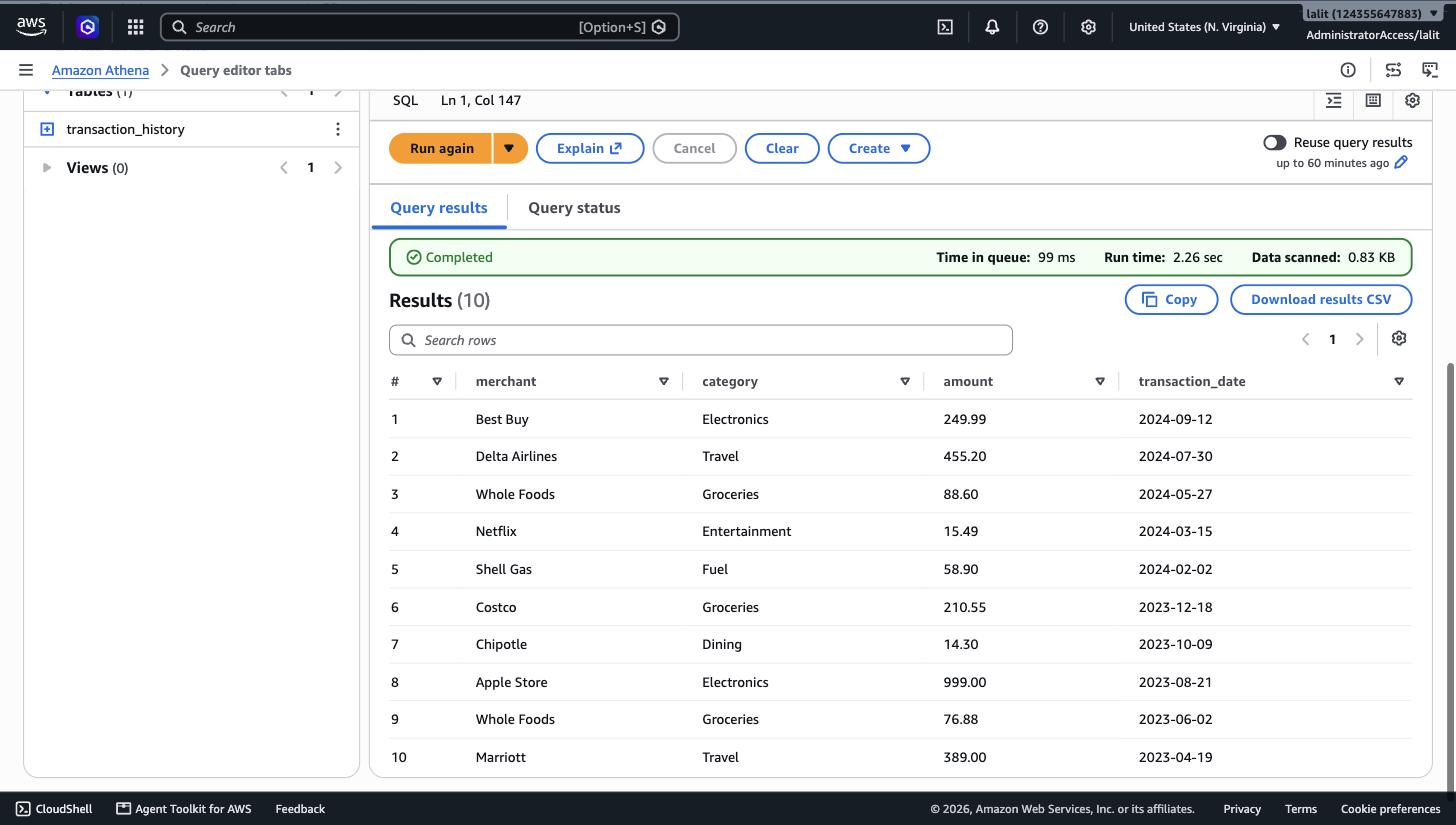
The same Iceberg table, queried straight from Athena for comparison — 0.83 KB scanned, thanks to Iceberg's column and file pruning.
07 — Materializing and monitoring
Materializing a hot slice
For data queried often enough that even the pruned S3 scan is overhead, CREATE TABLE … AS SELECT against the foreign table pulls it into native Aurora storage — the same pattern the release notes describe for INSERT and MERGE:
CREATE TABLE transaction_history_2024 AS
SELECT * FROM datalake.transaction_history_direct
WHERE transaction_date >= DATE '2024-01-01';
-- SELECT 8

SELECT count(*), min(transaction_date), max(transaction_date)
FROM transaction_history_2024;
-- 8 | 2024-02-02 | 2025-01-19
Watching what it actually scans
aurora_analytics_stat_statements() extends the familiar pg_stat_statements pattern with per-query timing, keyed to the same normalized query text you'd already recognize from any Postgres monitoring setup:
SELECT query, calls, total_exec_time, rows
FROM aurora_analytics_stat_statements()
WHERE query ILIKE '%transaction_history_direct%'
ORDER BY calls DESC;
| Query | Calls | Total exec time | Rows |
|---|---|---|---|
CREATE FOREIGN TABLE transaction_history_direct (…) |
1 | 78.0 ms | 0 |
SELECT * FROM datalake.transaction_history_direct LIMIT |
1 | 137.8 ms | 5 |
SELECT … UNION ALL … (the headline query) |
1 | 17.4 ms | 15 |
DROP FOREIGN TABLE IF EXISTS … |
1 | 2.5 ms | 0 |
The union query was faster than the raw table scan it was built from — by the time it ran, the Iceberg manifest read from the prior query was already cached. That's the "query caching" line in the release notes made concrete: the second touch of the same files didn't pay the S3 round trip again.
The full function returns far more than these four columns — it's structurally a superset of pg_stat_statements, with the standard planning/execution time percentiles (min/max/mean/stddev) plus buffer and I/O counters, giving a per-normalized-query view that a dashboard could poll directly rather than needing a separate CloudWatch metric for lake-query cost.
08 — Why bulk IMPORT FOREIGN SCHEMA didn't cooperate
Worth a section of its own because it's the one thing in this build that stayed unresolved rather than just requiring a workaround.
-- both attempts failed the same way
IMPORT FOREIGN SCHEMA iceberg_demo FROM SERVER aurora_analytics_server INTO datalake;
-- ERROR: Database returned SQL Exception

IMPORT FOREIGN SCHEMA iceberg_demo LIMIT TO (transaction_history)
  FROM SERVER aurora_analytics_server INTO datalake;
-- ERROR: Database returned SQL Exception  (same opaque message)
Unlike the version-hint.text error, the Data API surfaced no detail here — just a generic DatabaseErrorException. Confirmed the Glue table itself wasn't the problem: glue:GetTable showed a valid metadata_location pointing at exactly the file the direct CREATE FOREIGN TABLE used successfully a few commands later. No CloudWatch log group existed for the cluster (log exports weren't enabled on this build) to get a server-side stack trace, and standing one up felt disproportionate to a single debugging session.
The workaround that does scale past one table: since the Glue table parameter already holds the live metadata pointer, generating CREATE FOREIGN TABLE statements programmatically — one glue:GetTable call per table, one templated DDL statement — reproduces what bulk import is supposed to automate, in a dozen lines of script. Not zero-touch, but not hand-written per table either.
09 — What it costs, and teardown
Nothing here is free-tier. For a cluster used only for exploration like this one:
- Aurora Serverless v2, 0.5 ACU floor — roughly the cost of a small always-on instance, scaling with query activity; this workload never pushed past the floor.
- S3 — storage plus GET requests per scan; Iceberg's pruning keeps the per-query cost low, as the 0.83 KB scanned in §06 shows.
- Secrets Manager — one secret (~$0.40/month plus API calls), needed only because the RDS Data API requires secret-based auth rather than inline credentials.
- No separate charge for
aurora_analyticsitself — it bills as Aurora compute plus standard S3 request pricing, exactly as documented.
Everything built for this post — the cluster and instance, the S3 bucket and its Iceberg data, the Glue database and Athena workgroup, the IAM role, the Secrets Manager secret, and the security group and subnet group — gets torn down once the write-up is published. None of it is worth leaving on for a demo, and the teardown order is roughly the reverse of the build: instance → cluster → parameter group → security group → secret → IAM role → S3 objects → bucket → Glue/Athena objects.
10 — Appendix: every command, in order
The full build, condensed to commands only, for anyone reproducing this end to end.
Data lake — S3, Glue, Athena, Iceberg table
aws s3api create-bucket --bucket <bucket> --region us-east-1
aws s3api put-bucket-encryption --bucket <bucket> --server-side-encryption-configuration '{"Rules":[{"ApplyServerSideEncryptionByDefault":{"SSEAlgorithm":"AES256"}}]}'
aws s3api put-public-access-block --bucket <bucket> --public-access-block-configuration BlockPublicAcls=true,IgnorePublicAcls=true,BlockPublicPolicy=true,RestrictPublicBuckets=true
aws glue create-database --database-input '{"Name":"iceberg_demo"}'
aws athena create-work-group --name iceberg-demo-wg --configuration "ResultConfiguration={OutputLocation=s3://<bucket>/athena-results/},EnforceWorkGroupConfiguration=true"
aws athena start-query-execution --work-group iceberg-demo-wg --query-execution-context Database=iceberg_demo --query-string "CREATE TABLE transaction_history (...) LOCATION 's3://<bucket>/iceberg/transaction_history/' TBLPROPERTIES ('table_type'='ICEBERG', ...)"
aws athena start-query-execution --work-group iceberg-demo-wg --query-execution-context Database=iceberg_demo --query-string "INSERT INTO transaction_history VALUES (...), (...), ..."
Aurora — VPC, cluster, instance, IAM role
aws rds describe-db-engine-versions --engine aurora-postgresql --query "DBEngineVersions[?EngineVersion>='17.11'].EngineVersion"
aws ec2 describe-vpcs --filters Name=is-default,Values=true
aws ec2 create-security-group --group-name iceberg-demo-aurora-sg --vpc-id <vpc>
aws ec2 authorize-security-group-ingress --group-id <sg> --protocol tcp --port 5432 --cidr <ip>/32
aws rds create-db-subnet-group --db-subnet-group-name iceberg-demo-subnet-group --subnet-ids <subnet1> <subnet2> <subnet3>
aws rds create-db-cluster --db-cluster-identifier iceberg-demo-cluster --engine aurora-postgresql --engine-version 17.11 --master-username pgadmin --master-user-password <pw> --db-subnet-group-name iceberg-demo-subnet-group --vpc-security-group-ids <sg> --serverless-v2-scaling-configuration MinCapacity=0.5,MaxCapacity=2 --enable-http-endpoint --storage-encrypted --database-name icebergdemo
aws rds create-db-instance --db-instance-identifier iceberg-demo-instance-1 --db-cluster-identifier iceberg-demo-cluster --engine aurora-postgresql --db-instance-class db.serverless --publicly-accessible
aws iam create-role --role-name aurora-analytics-iceberg-demo-role --assume-role-policy-document file://trust-policy.json
aws iam put-role-policy --role-name aurora-analytics-iceberg-demo-role --policy-name AuroraAnalyticsS3GlueAccess --policy-document file://analytics-policy.json
aws rds add-role-to-db-cluster --db-cluster-identifier iceberg-demo-cluster --role-arn <role-arn> --feature-name AuroraAnalytics
Enable the extension — parameter group + reboot
aws rds create-db-cluster-parameter-group --db-cluster-parameter-group-name iceberg-demo-pg17 --db-parameter-group-family aurora-postgresql17
aws rds modify-db-cluster-parameter-group --db-cluster-parameter-group-name iceberg-demo-pg17 --parameters "ParameterName=aurora_analytics.enabled,ParameterValue=1,ApplyMethod=pending-reboot"
aws rds modify-db-cluster --db-cluster-identifier iceberg-demo-cluster --db-cluster-parameter-group-name iceberg-demo-pg17 --apply-immediately
aws rds reboot-db-instance --db-instance-identifier iceberg-demo-instance-1
aws rds wait db-instance-available --db-instance-identifier iceberg-demo-instance-1
Data API access — secret + execute-statement
aws secretsmanager create-secret --name iceberg-demo/aurora-master --secret-string '{"username":"pgadmin","password":"<pw>"}'
aws rds-data execute-statement --resource-arn <cluster-arn> --secret-arn <secret-arn> --database icebergdemo --sql "<any single SQL statement>"
SQL — extension, foreign table, union query, teardown-safe cleanup
CREATE EXTENSION aurora_analytics;
CREATE SCHEMA datalake;
CREATE FOREIGN TABLE datalake.transaction_history_direct ()
  SERVER aurora_analytics_server
  OPTIONS (location 's3://<bucket>/iceberg/transaction_history/metadata/<current>.metadata.json', format 'iceberg');
CREATE TABLE recent_transactions (transaction_id text PRIMARY KEY, customer_id text, merchant text, category text, amount numeric(10,2), transaction_date date);
INSERT INTO recent_transactions VALUES (...);
SELECT merchant, category, amount, transaction_date, 'recent' AS source FROM recent_transactions WHERE customer_id = 'C-1001'
UNION ALL
SELECT merchant, category, amount, transaction_date, 'historical' AS source FROM datalake.transaction_history_direct WHERE customer_id = 'C-1001' AND transaction_date >= CURRENT_DATE - INTERVAL '5 years'
ORDER BY transaction_date DESC LIMIT 15;
CREATE TABLE transaction_history_2024 AS SELECT * FROM datalake.transaction_history_direct WHERE transaction_date >= DATE '2024-01-01';
SELECT query, calls, total_exec_time, rows FROM aurora_analytics_stat_statements() WHERE query ILIKE '%transaction_history_direct%' ORDER BY calls DESC;
Built end-to-end with the AWS CLI, the RDS Data API, and the Athena and Glue consoles — Aurora PostgreSQL 17.11, us-east-1.