Simplifying serverless: multiple endpoints in one Python Lambda with APIGatewayRestResolver
How AWS Lambda Powertools' APIGatewayRestResolver turns one Python Lambda into a full mini-API - routes, decorators, validation.
· #aws #lambda #python
Published September 13, 2024

Hey LinkedIn fam! 👋 Today, I want to share a game-changing discovery that revolutionized how I handle multiple endpoints in my Python Lambda functions. Buckle up for a journey through the serverless landscape! 🏞️
The Challenge 😓
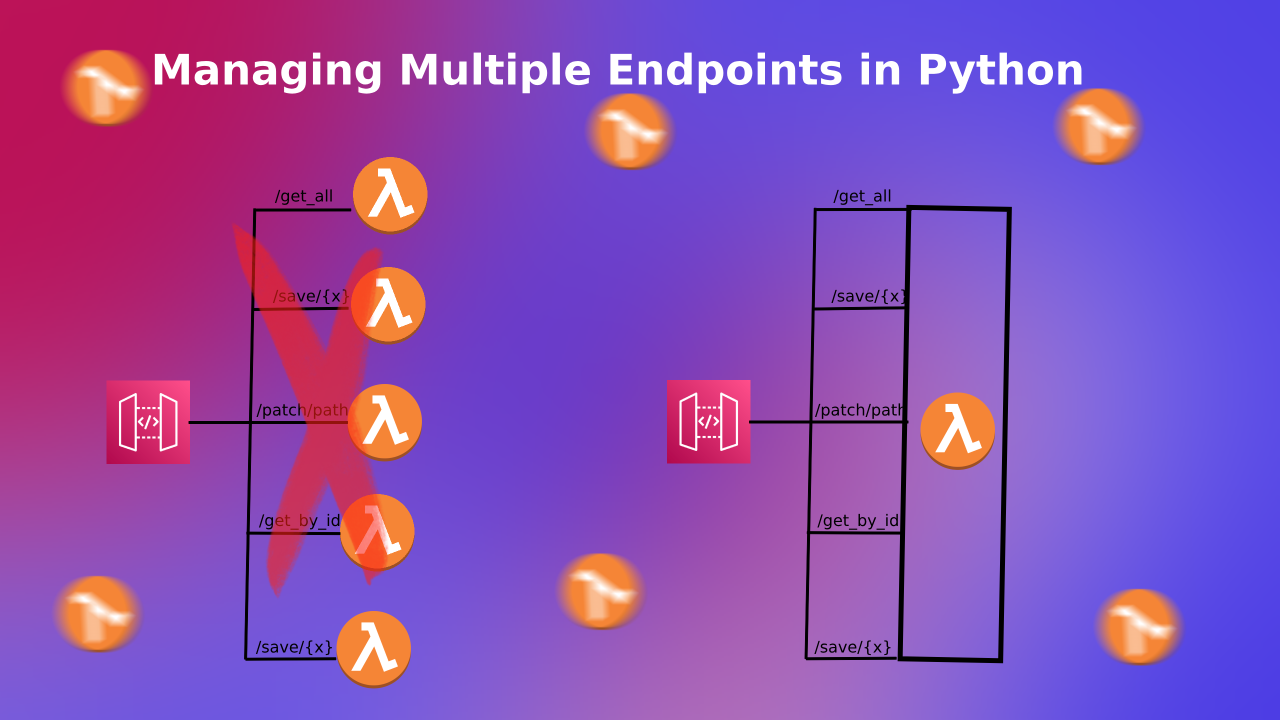
Picture this: You're building a serverless API for your startup's new product catalog. It would help if you had endpoints for listing products, adding new ones, updating existing ones, and more. Suddenly, your Lambda function looks like a maze of if-else statements, trying to route requests to the right handler. Sound familiar?
Enter the Hero: APIGatewayRestResolver 🦸♂️
That's when I stumbled upon the APIGatewayRestResolver from the AWS Lambda Powertools for Python. It was like finding a Swiss Army knife in a drawer full of butter knives! 🔪
The Magic Unfolds: A Step-by-Step Guide 🪄
Let's walk through how to implement this in your own project:
Step 1: Setting Up the Lambda Function 🏗️
Create a new Lambda function 📦 Go to the AWS Lambda console Click "Create function" Choose "Author from scratch" Set a function name (e.g., "ProductCatalogAPI") Select Python 3.9 (or later) as the runtime Choose an existing role or create a new one with basic Lambda permissions Click "Create function"Add a Lambda layer for AWS Lambda Powertools 🧅 In the Lambda function page, scroll down to the "Layers" section Click "Add a layer" Choose "AWSLambdaPowertoolsPythonV2-Arm64" for the latest version of AWS Lambda Powertools.Update the Lambda function code 💻 In the "Code" tab of your Lambda function, replace the existing code with the following:
from aws_lambda_powertools import Logger, Tracer
from aws_lambda_powertools.event_handler import APIGatewayRestResolver
from aws_lambda_powertools.logging import correlation_paths
from aws_lambda_powertools.utilities.typing import LambdaContext
from pydantic import BaseModel, Field

tracer = Tracer()
logger = Logger()
app = APIGatewayRestResolver(enable_validation=True)

class InputRequest(BaseModel):
    userId: int
    title: str
    completed: bool = None

@app.get("/ping")
@tracer.capture_method
def get_ping():

    return {"todos": "live", "status": "200"}

@app.get("/todo/<task>")
@tracer.capture_method
def get_todos(task: str):
    return {"todos": f"todo has been included {task}", "status": "200"}


@app.post("/post-test")
@tracer.capture_method
def get_todos(input: InputRequest):
    return input.json()


# You can continue to use other utilities just as before
@logger.inject_lambda_context(correlation_id_path=correlation_paths.API_GATEWAY_HTTP)
@tracer.capture_lambda_handler
def lambda_handler(event: dict, context: LambdaContext) -> dict:
    print(event)
    return app.resolve(event, context)
4. Deploy the Lambda function 🚀 Click "Deploy" to save and deploy your changes
Step 2: Setting Up API Gateway Resources 🌉
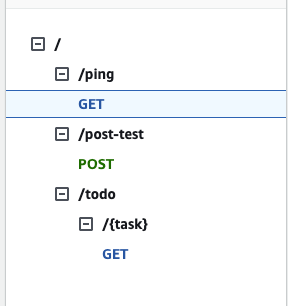
Now that we have our Lambda function set up, let's create the necessary resources in API Gateway to handle these endpoints:
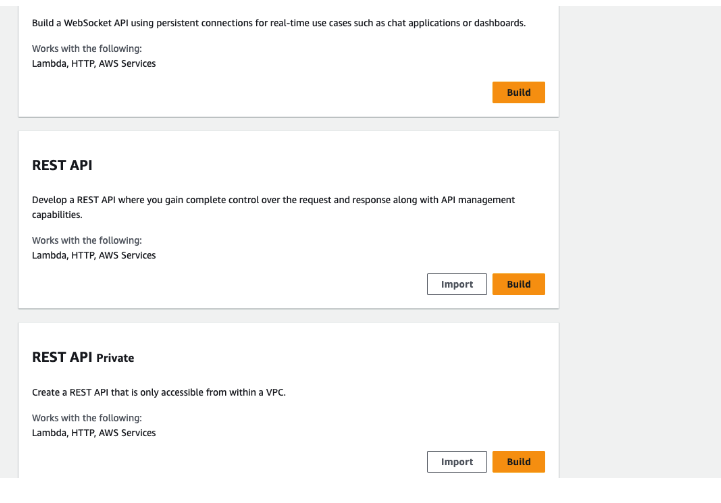
Create a new API 🆕 Go to the API Gateway console Click "Create API" and choose "REST API" Give your API a name (e.g., "AdvancedServerlessAPI")
Create the /ping resource and method 🏓 In the left sidebar, click on "Resources" Click "Create Resource" Set Resource Name to "ping" and Resource Path to "/ping" Click "Create Resource" With the /ping resource selected, click "Create Method" Choose "GET" from the dropdown and click the checkmark For Integration type, choose "Lambda Function" Select your Lambda function Ensure "Use Lambda Proxy integration" is checked Click "Save" and "OK" to grant permission to API Gateway
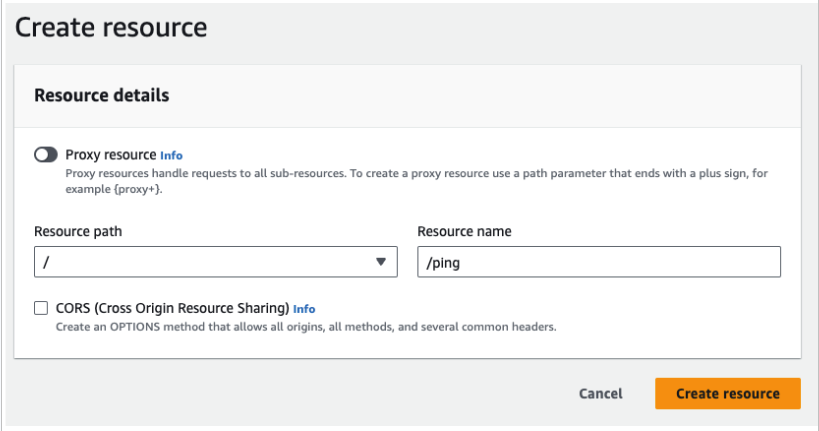
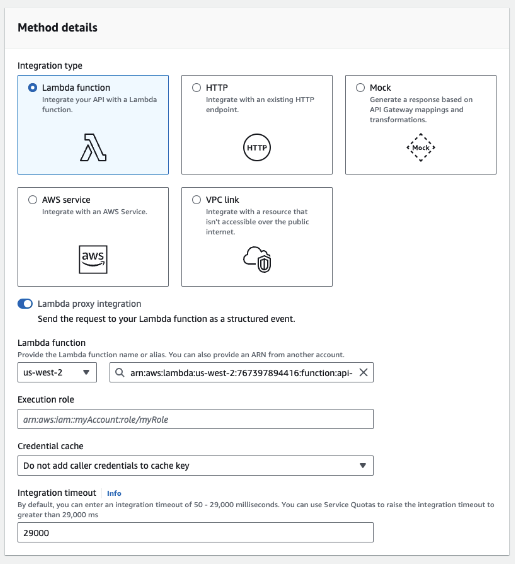
Create the /todo/{task} resource and method 📋 Go back to the root resource ("/") Click "Create Resource" Set Resource Name to "todo" and Resource Path to "/todo" Click "Create Resource" With the /todo resource selected, click "Create Resource" Check "Configure as proxy resource" Set Resource Name to "task" and Resource Path to "{task}" Click "Create Resource" The ANY method should be automatically created Click on the ANY method Ensure "Lambda Function" is selected for the integration type Choose your Lambda function Ensure "Use Lambda Proxy integration" is checked Click "Save"Create the /post-test resource and method 📮 Go back to the root resource ("/") Click "Create Resource" Set Resource Name to "post-test" and Resource Path to "/post-test" Click "Create Resource" With the /post-test resource selected, click "Create Method" Choose "POST" from the dropdown and click the checkmark For Integration type, choose "Lambda Function" Select your Lambda function Ensure "Use Lambda Proxy integration" is checked Click "Save" and "OK" to grant permission to API GatewayDeploy the API 🚀 Click "Deploy API" from the Actions dropdown Choose a deployment stage (e.g., "prod") Make note of the invoke URL provided after deployment
Testing Your New API 🧪
You can now test your API using the invoke URL from API Gateway. Here are the available endpoints:
GET request to /pingGET request to /todo/{task} (replace {task} with any string)POST request to /post-test with a JSON body like:
{
  "userId": 1,
  "title": "My Todo",
  "completed": false
}
The Power of This Setup 💪
Specific Routing : We've set up only the routes we need, making our API focused and efficient.Input Validation : Pydantic models ensure our inputs are always valid.Tracing and Logging : Built-in tracing and structured logging make debugging a breeze.Flexibility : Lambda Proxy Integration allows our Lambda to handle the routing logic for each endpoint.
Wrapping Up 🎁
This advanced serverless setup provides a robust foundation for building complex APIs. The combination of AWS Lambda Powertools, Pydantic, and Lambda Proxy Integration offers flexibility, performance, and ease of development.
Have you used a similar setup in your projects? What other advanced serverless patterns have you found useful? Let's discuss in the comments! 💬